
Configure PHP to your liking with just one click from the cdmon panel
Every website has its own needs, and at cdmon we know it. That’s why we give you full control to customize the PHP configuration on your hostings directly from the control panel. Fast, visual, and without technical knowledge.
With our PHP Configuration tool, you can tailor your execution environment to perfectly match the behavior of your website or application. All without leaving cdmon.
What can you configure?
🧩 PHP Version
Select the most suitable version for your application, from stable versions to the latest ones.
⏱️ max_execution_time
Control how long a script can run before stopping.
📄 memory_limit
Define the maximum memory a script can consume. Ideal for heavy processes.
🧠 upload_max_filesize & post_max_size
Adjust the maximum allowed size for file uploads and form submissions.
🗂️ display_errors & log_errors
Decide whether errors should be displayed on screen or logged.
🌐 allow_url_fopen
Allow (or not) scripts to open remote files as if they were local.
…and many other advanced options like session.gc_maxlifetime, max_input_vars, etc.
How is it used?
- Access your cdmon control panel.
- Go to the Hosting Management section of the corresponding service.
- Click on Server and then on PHP Configuration.

- Select and adjust the parameters you need.
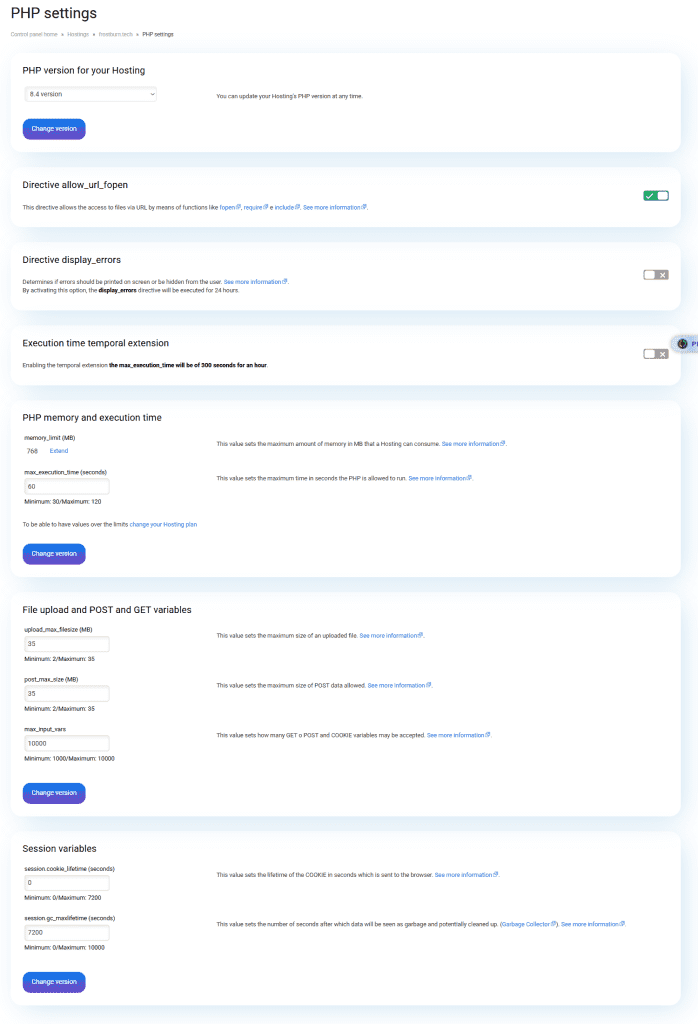
- Save the changes… and that’s it!
Key Advantages
✅ No technical complications
You don’t need to edit files or know commands. Everything is done from a visual panel.
🧩 100% personalized
Each hosting can have its own PHP configuration tailored to what it really needs.
🕒 Real-time changes
Modifications are applied immediately, without affecting your website’s availability.
🔒 More security and performance
Adjusting PHP can help you prevent errors, avoid resource abuse, and strengthen your environment.
📚 Guides and contextual help
Each parameter comes with a useful explanation so you know exactly what you’re modifying.
Frequently Asked Questions
Can I use different PHP versions on different hostings?
Yes, each hosting allows you to select its own PHP version.
Is there a risk of breaking the website if I change a parameter?
No, you can easily revert to default values if something doesn’t work as expected.
Do the changes affect other websites I have on the same server?
No, the configuration is specific to each individual hosting.
Is this feature available on all plans?
Yes, it is included in all hostings, VPS, and dedicated servers managed by cdmon.
Your website, with the PHP it needs
With the PHP configuration tool from cdmon, you have control. Adjust the values that really matter for the performance, compatibility, and security of your website without needing to be an expert.
Because every project is different, give your PHP the configuration it deserves.
👉 Enter now in your cdmon panel and adapt PHP your way. No limits, no fear, no complications.

By: Marina Moreno
She works on cdmon's marketing team, creating content that helps businesses, professionals, and creators better understand the world of hosting, domains, and online presence. She is especially interested in how artificial intelligence, search engines, and digital communication are evolving, and enjoys translating technical concepts into language that anyone can understand.
You can learn more about her background on LinkedIn


