
Can I have professional email with my domain?
Having a professional email with your own domain is not only possible, but it is one of the smartest decisions if you are starting a project, a brand, or simply want to improve your digital presence. Of course, having an email like name@yourbusiness.com creates a very different first impression than a yourbusiness123@gmail.com, right?
But how do you achieve that? How much does it cost? Do I need to know about computers? Don’t worry, you’re in the right place. Here we tell you everything, from the basics to some technical details, without complications and with real examples.
Table of contents
- What is a professional email and why is it important?
- Is it possible to have professional email with any domain?
- How does professional email with your own domain work?
- Options to get professional email with your domain
- Advantages of using professional email with your own domain
- Steps to create your professional email with domain
- Frequently asked questions about professional email with domain
- Final thoughts
What is a professional email and why is it important?
A professional email is an email address that uses your own domain (for example, @myvintagestore.com). Unlike free accounts like Gmail or Hotmail, these accounts are customized with your brand and reflect a level of professionalism that the others do not reach.
Why is it so important?
- It gives confidence to your clients. A corporate email shows that there is a structure behind it, even if it’s just you.
- It reinforces your brand identity. Every email you send carries your name, and that positions you better.
- It avoids confusion. An email with your domain is easy to remember and hard to confuse.
Is it possible to have professional email with any domain?
The answer is simple: yes. If you already have a domain, you can create emails with it. It doesn’t matter if it’s .com, .es, .net, or any other extension.
Additionally, you can create multiple accounts within the same domain, such as:
- contact@myvintagestore.com
- sales@myvintagestore.com
- lucia@myvintagestore.com
This way, you keep everything organized and tailored to your needs.
How does professional email with your own domain work?
You don’t need to be technical to understand it, but it’s good to know the basics:
- When you buy a domain, you can associate it with a mail server.
- That server is responsible for sending and receiving your emails.
- For everything to work, you need to configure some records called MX (Mail Exchange) that tell the domain which server to go to for emails.
Other useful terms:
- IMAP: keeps emails on the server, ideal if you use multiple devices.
- POP3: downloads emails and deletes them from the server. Less recommended today.
- Webmail: access your email from the browser, without needing to install anything.
Options to get professional email with your domain
Before diving into the options, there’s something important we must clarify: it’s not possible to have professional email just by registering a domain. The domain is just the name—like myvintagestore.com—but for that name to have functionality (email, web, etc.), you have to associate it with a system that processes the information: a hosting service.
And this is where several paths appear, depending on what you need right now: Just email? Email and web? Something more powerful for the future?
Through a hosting provider (like cdmon)
One of the most common ways is to get a web hosting plan. At cdmon, for example, each registered domain includes the microplan for free, which offers:
- 50 MB of space for a simple website (in case you want to show something basic)
- 1 professional email account
This microplan is ideal if you’re starting your project and want a basic but functional solution. And if in the future you need more space, more emails, or new tools, you can easily upgrade.
Besides the microplan, cdmon also offers other types of hosting with email included:
- Shared hosting plans, with more space and multiple accounts
- Advanced hosting if you manage multiple projects or use CMS like WordPress
- VPS or dedicated servers, for very specific needs or high volume
Email only, no web (email hosting services)
Don’t need a website yet? Then what you need is email hosting: a service designed just for emails. Here the important thing is that, even if you don’t host a page, you do need a minimum technical hosting to manage the messages.
These services include:
- Exclusive space for email
- Advanced spam filters and security
- Simple management panels
- Compatibility with IMAP, POP3, and Webmail
And as we have already mentioned, if you register your domain with cdmon, you already have this covered with the free microplan.
For broader needs (multiple emails, more space, automatic backups, etc.), you can opt for more advanced email-only plans.
Integration with external platforms
Another very useful option is to integrate your domain with external platforms:
- Google Workspace: you can manage your emails from the Gmail interface, but with your customized domain. Ideal if you already use Google Calendar, Drive, etc.
- Microsoft 365: professional email with Outlook and access to the entire Office online suite.
Both solutions offer great capacity, collaborative functions, advanced protection, and cloud synchronization. However, they have a monthly cost, so it’s worth considering if you need so many features right now.
Advantages of using professional email with your own domain
Using a professional email with your own domain conveys immediate trust. It doesn’t have the same impact to receive a message from a @gmail.com as from a @company.com; the latter shows that there is a serious project behind it.
Additionally, it gives you total control over your accounts: you decide how many to create, how to name them, and when to delete or modify them, without relying on external services or changing conditions.
From a legal point of view, it is also a wise decision. Having your own email system makes it easier to comply with regulations like GDPR, as you can better manage privacy and data storage.
And as if that weren’t enough, you are also gaining in security: professional email servers usually have better spam filters, updated protocols, and protection tools for your messages and those of your clients.
Steps to create your professional email with domain
Creating your first professional email is not as complicated as it seems. You just need to follow these steps, and, in a few minutes, you will have an address that conveys seriousness, trust, and professionalism.
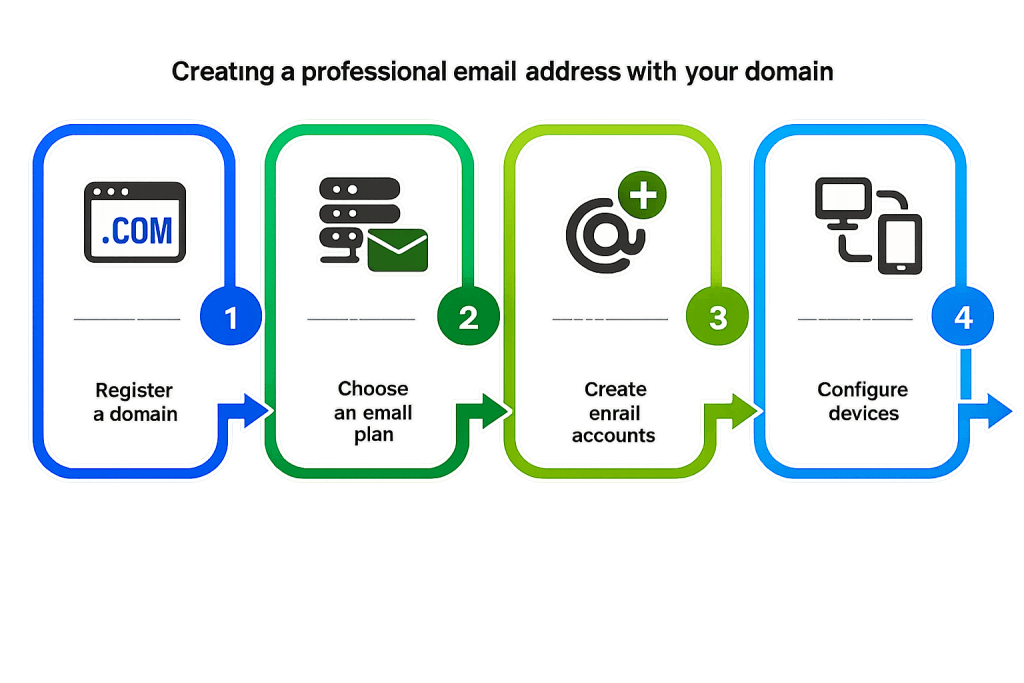
Register a domain (if you don’t have one)
This is the starting point. Think of a name that represents your project or brand. It can be your personal name, your store’s name, or any combination that is easy to remember and write. Once decided, go to cdmon, check if it’s available, and register it.
Remember: you can choose from different extensions like .com, .es, .net, etc. All work the same for having a professional email.
Get an email plan or hosting with email included
This is where you bring your domain to life. If you don’t need a website yet, you can start with the free microplan from cdmon, which already includes a professional email account. No additional costs and no complications.
If later you want more emails or storage, you can easily upgrade to a more complete plan with just a few clicks, without losing what you have already configured.
Create email accounts from the Control Panel
Once your plan is active, access the cdmon control panel. From there, you can create customized addresses like info@yourdomain.com or name@yourdomain.com.
The good thing is that you decide how to organize it: one account for you, another for orders, another for contact… all from the same place and under your brand.
Configure devices (mobile, PC, webmail)
Now it’s time to access your email. You can enter through the webmail, which is like Gmail but with your domain, or configure it on your mobile or computer with apps like Outlook, Apple Mail, or Thunderbird.
Using the IMAP protocol, everything you do (read, reply, archive) syncs across all your devices. This way, you can check your email wherever you are, without losing track.
Frequently asked questions about professional email with domain
We know that when starting a digital project, the world of hosting and professional email can seem a bit technical. But in reality, with a good foundation and a simple platform like cdmon, everything becomes much easier. Here we answer some of the most common questions that usually arise just before taking the step.
How many accounts can I have?
This will depend on the email or hosting plan you choose. If you have registered your domain with cdmon, you already have the free microplan included, which offers one professional email account with its own space and management panel.
But if your project grows or you need to separate areas (like sales, support, management, etc.), you can easily upgrade to plans that allow multiple accounts, more storage, and advanced features. The good thing is that you start with the basics and only evolve when you need it.
Can I use my domain with Gmail or Outlook?
Yes, you can do it perfectly. Although your professional email is hosted on cdmon, you can read and send messages from interfaces like Gmail or Outlook, integrating your account into these email managers that you already know.
In the case of Gmail, you can configure it to receive emails from your domain using POP3 and also to send them as if you were inside your professional account. You just need to have two-step verification enabled on your Google account and create an app password. The process is quick and convenient, and you can follow it step by step with this official guide from cdmon:
👉 How to configure cdmon email in Gmail
If you prefer Outlook (Microsoft 365) as your email client, you can also integrate your cdmon account there using IMAP or POP3, according to your preference. Outlook will allow you to manage multiple mailboxes in one place and enjoy a professional and familiar interface. Here is the detailed guide to configure it correctly:
👉 How to configure email in Outlook 365 (available only in Spanish)
In both cases, the important thing is that you can maintain your personalized address with your own domain and at the same time work from the platforms that best suit your day-to-day, without losing functionalities or professional image.
What happens if I change provider?
One of the advantages of having your own domain is that you are not tied to any provider. If you decide to change your email service, you will only have to update the MX records of your domain so that the emails start arriving at the new server.
This means that your email address remains the same, only the “house” that manages it behind the scenes changes. If you make the transition carefully, you can change providers without interruptions in service.
Is professional email secure?
Yes, and much more than using free or personal accounts for business matters. Professional email services usually include advanced security measures, such as spam filters, encrypted communications, or virus protection.
Final thoughts
Having a professional email with your own domain is not just a detail; it is a strategic decision that improves how others perceive you and how you manage your communication. Every message sent from a personalized address makes it clear that your project is real, serious, and well cared for.
And the best part is that you don’t need great resources or technical knowledge to start. With something as simple as registering your domain on cdmon, you can already activate the microplan for free and have your first personalized email account in minutes. From there, growing and scaling your communication will be a matter of time.
So if you’re starting, take that first step: professionalize your presence from the email. The rest will come naturally. And if you’re already in, remember that you can count on us to keep evolving.

By: Marina Moreno
She works on cdmon's marketing team, creating content that helps businesses, professionals, and creators better understand the world of hosting, domains, and online presence. She is especially interested in how artificial intelligence, search engines, and digital communication are evolving, and enjoys translating technical concepts into language that anyone can understand.
You can learn more about her background on LinkedIn


