
What is a CDN and how can it speed up your website
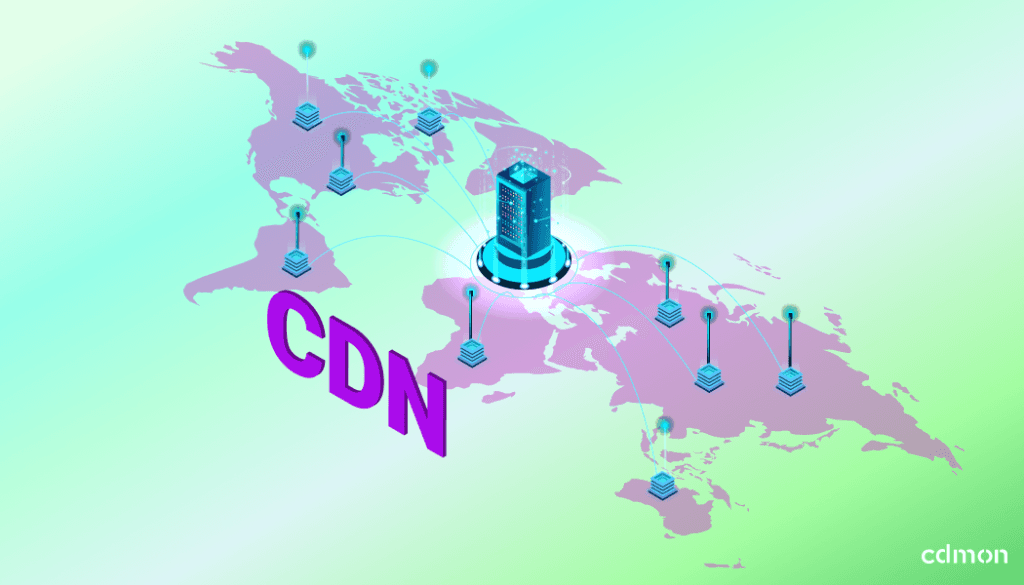
Your website can be hosted in Spain and receive visits from anywhere in the world. The problem is that the farther a person is from the server, the longer the images, styles, and other files have to travel before appearing on their screen.
A CDN shortens that path, and you can activate it at no additional cost in compatible hosting plans from cdmon.
Table of Contents
What is a CDN?
CDN stands for Content Delivery Network, which can be translated as content distribution network.
It is a network of servers located in different geographical areas that store temporary copies of a website’s files. When a person requests one of those resources, the CDN can deliver it from a point closer to their location.
The CDN does not replace the hosting or move the website to another location. The origin server continues to store the project and process requests that need to be generated in real-time.
Among the contents that a CDN can distribute are:
- Images.
- Videos.
- CSS style sheets.
- JavaScript files.
- Fonts.
- Other static and cacheable resources.
Imagine a website hosted in Spain that receives a visit from Latin America. Without a CDN, the files must travel all the way from the origin server. With a CDN, part of those contents can be delivered from a closer point of presence.
The distance does not disappear, but it has less influence on the browsing experience.
How a CDN works
The operation can be summarized in four steps:
- A person enters the website, and their browser requests the necessary files to display it.
- If the CDN already has a valid copy, it delivers the resource from a nearby point of presence.
- If it does not yet have that copy, it obtains the file from the origin server and stores it temporarily.
- Dynamic requests that cannot be cached continue to be processed in the hosting.
These points of presence are also known as PoP, for the initials of Point of Presence. They are the locations from which the CDN delivers content to visitors.
The CDN of cdmon has more than 70 points of presence distributed worldwide, three of them in Spain.
What happens with dynamic content?
The CDN of cdmon mainly distributes static and cacheable content, such as images, videos, fonts, CSS, and JavaScript.
Requests that need to be processed in real-time and cannot be cached continue to reach the origin server. In this way, the CDN takes care of bringing the files it can reuse closer, while the hosting manages the dynamic processes of the website.
What benefits does the cdmon CDN provide?
A CDN can optimize content delivery, reduce the load on the origin server, and provide greater stability when traffic increases. At cdmon, it is also directly integrated into the hosting.
| Benefit | What does the cdmon CDN provide? |
|---|---|
| Closer content | Distributes cacheable files from more than 70 points of presence, three of them in Spain. |
| Less load for hosting | Handles part of the requests and allows the server to focus on dynamic processes. |
| Greater stability | Distributes content delivery during campaigns, launches, or traffic increases. |
| Additional protection | Includes protection against DDoS attacks on layers 3 and 4 and anomaly detection. |
| Easy activation | Automates the necessary changes in DNS and SSL certificate provisioning. |
| Integrated management | Managed from the cdmon panel, without relying on an external platform. |
| No additional cost | Included in compatible hosting, with the transfer corresponding to each plan. |
The specific improvement will depend on each project, the location of its visitors, the weight of the files, and the previous optimization of the website. There is no valid acceleration percentage for all pages.
The CDN complements the performance and security of the hosting, but does not replace a properly sized hosting or other necessary measures, such as updating the CMS and its extensions, using secure passwords, or protecting access.
CDN, cache, and Varnish: are they the same?
No, although the three concepts are related to performance.
Cache involves temporarily storing a copy of content so it does not have to be generated or downloaded again with each request.
A CDN applies this principle through a network of geographical locations. Its main advantage is bringing cacheable files closer to those visiting the website.
Varnish, on the other hand, is a cache system that works alongside the origin server. It can speed up the hosting response by preventing the application from repeatedly generating the same content.
At cdmon, the CDN and Varnish cannot remain active simultaneously on the same website. If you use Varnish, you must deactivate it before activating the CDN.
You can expand this explanation in our article on what web cache is and what it is for.
The CDN is included in your cdmon hosting
The CDN is included at no additional cost in all cdmon hosting plans:
- Hosting Start.
- Hosting Junior.
- Hosting Senior.
- Hosting Master.
- Hosting associated with virtual servers.
- Hosting associated with dedicated servers.
To activate it, your domain must use the cdmon DNS servers. Don’t know what that means? We explain what DNS, their records, and servers are and how a DNS server works.
Each plan has a specific amount of monthly transfer for the CDN. The consumption can be checked from the Control Panel and the system sends alerts when it approaches the available limit.
If 100% of the included transfer is consumed, the CDN temporarily stops distributing the files until the renewal of the corresponding period. The website remains accessible and resumes serving its content directly from the origin hosting.
Select your hosting, go to Server > CDN and activate the service. No manual configurations or external platforms.
Access the panel and activate the CDN
Which websites can benefit most from a CDN?
The CDN can be useful for different types of projects, although its effects will be more visible when there is distance between the server and the visitors or many static files are distributed.
Websites with visitors from different countries
This is one of the clearest cases. When a website receives international traffic, a CDN reduces the dependency on physical distance from the origin server.
For example, if the project is hosted in Spain and receives visits from Latin America, part of its cacheable content can be delivered from a point of presence closer to the visitor.
Online stores
Stores often use numerous product images, style sheets, and JavaScript files. Speeding up their delivery can make browsing the catalog smoother.
The CDN does not replace the optimization of images, the theme, or the store’s dynamic processes, but it can ease the distribution of its static resources.
Portfolios and websites with many images or videos
Portfolios, media, catalogs, and audiovisual projects can handle large amounts of static resources.
A CDN helps distribute them, although it is still important to compress images, use appropriate formats, and control the weight of videos.
Projects with traffic spikes
Launches, promotions, advertising campaigns, or viral content can concentrate many visits in a short time.
The CDN distributes the delivery of cached content and reduces the direct load received by the origin server during those moments.
Websites created with WordPress
A CDN can distribute images, CSS, JavaScript, and other files used by websites hosted on a WordPress and WooCommerce hosting.
Even so, it is advisable to keep WordPress, the template, and plugins updated, remove unnecessary extensions, and periodically review the project’s performance.
What you should check before activating it
The activation process is simple, but some conditions must be met.
The DNS must be managed in cdmon
Your domain must use the cdmon DNS servers. This condition allows the system to automatically make the necessary changes to provision the service.
If you use external DNS, you must first manage them from cdmon to activate the CDN at no additional cost.
Varnish must be deactivated
The CDN and Varnish cannot be used simultaneously on the same website. If you have Varnish active, you must deactivate it before continuing.
You must remove any external CDN
If you use Cloudflare or another external CDN, you must first deactivate it and revert its configuration.
Maintaining two CDNs simultaneously can cause conflicts related to DNS, certificates, or cache.
If you have doubts about the configuration that best suits your project, you can contact the cdmon Support team.
The SSL certificate is configured automatically
During activation, cdmon prepares the necessary DNS records and provisions a Let’s Encrypt SSL certificate to distribute content via HTTPS.
You do not need to create records manually or install the certificate.
If you use a custom or external certificate, note that it is currently not possible to install that same certificate on the CDN.
You can expand the information about its operation on the cdmon SSL certificates page.
How to activate the cdmon CDN
You do not need to make manual changes to the website.
To activate the service, the first step is to access the cdmon Control Panel. Select the corresponding hosting, and in the Server section, access the CDN section.

Here you will have a switch to activate the service.
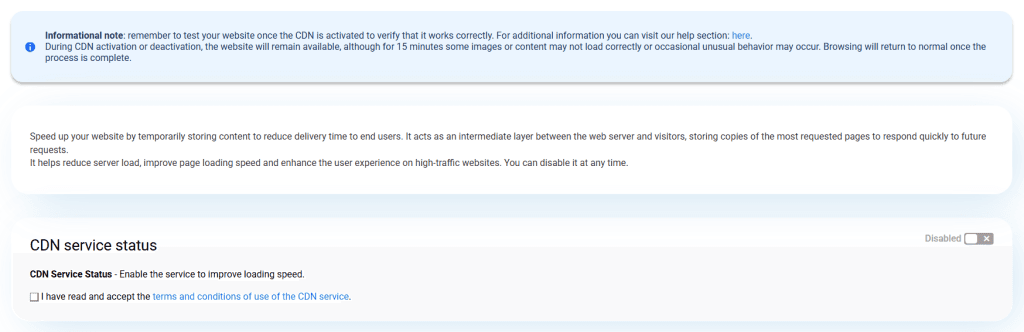
From that moment, cdmon automatically takes care of provisioning, the necessary DNS changes, and the SSL certificate.
Activation can take up to approximately 15 minutes due to service provisioning and DNS propagation.
Your CDN, ready with a single click and at no additional cost.
You can also deactivate it from the same panel section used to activate it. cdmon will automatically revert the necessary configuration so that the website resumes delivering all its content from the origin hosting.
Frequently Asked Questions
It is included at no additional cost in the Start, Junior, Senior, and Master plans and in hosting associated with virtual and dedicated servers. Each plan has a specific amount of monthly transfer.
It distributes static and cacheable content, such as images, videos, fonts, CSS style sheets, and JavaScript files. Dynamic requests continue to be processed in the origin hosting.
Not manually. If the DNS is managed in cdmon, the system makes the necessary changes and automatically provisions a Let’s Encrypt SSL certificate for the CDN.
If you consume 100% of the included transfer, the CDN stops distributing the content and it is served directly from the origin hosting. At that moment, cdmon automatically deprovisions the CDN. This process can take up to 15 minutes, during which the delivery of some content may not function normally. Once completed, the website will continue serving its content from the origin hosting.
No. You must deactivate Varnish and remove any external CDN before activating the cdmon CDN to avoid cache, DNS, or certificate conflicts.
Yes. The cdmon CDN can distribute images, CSS style sheets, JavaScript files, and other static and cacheable resources used by WordPress and WooCommerce.
It does not automatically improve positioning. It can indirectly contribute to SEO by reducing latency, speeding up content delivery, and improving the browsing experience.

By: Miriam Chica
She is part of cdmon's development team. Her background combines experience in technical support and software development, allowing her to clearly explain how technologies such as DNS, servers, and Internet security work. On the cdmon blog, she shares content that helps readers understand technical concepts in a clear and accessible way.
You can learn more about her background on LinkedIn


